
AI Documentary Video Cost: Credits vs Subscriptions vs Cloud
Compare pay-as-you-go credits, AI video subscriptions, and bring-your-own-cloud costs using verified July 2026 prices and scenarios.

The public entry points checked July 19, 2026 were: Veedyoo top-ups from $5 with no subscription, VidRush plans displayed from 99 per month, and OpenVidi from $29 per month plus separate Google Cloud compute. The cheapest model depends on how much of the allowance you use, how often you regenerate scenes, and which production work the price includes.
That is why an AI documentary rarely has one universal price. The useful question is: What will this workflow cost at the amount I actually publish, after generation, revisions, rendering, and unused capacity?
This guide compares three public pricing models as they appeared on July 19, 2026:
- Veedyoo’s pay-as-you-go credits;
- VidRush’s monthly production subscriptions;
- OpenVidi’s subscription plus bring-your-own Google Cloud compute.
Prices are only one part of the decision. The products make different kinds of video and place different responsibilities on the creator. Treat the arithmetic below as a budgeting framework, not a promise that three different outputs are interchangeable.
The three AI video cost models at a glance
| Product | Billing model | Public starting point | What can sit outside that price | Best fit |
|---|---|---|---|---|
| Veedyoo | Pay-as-you-go credits | Top-ups from $5; no monthly subscription | More generation, replacement assets, or rendering uses more credits | Sporadic production, short documentaries, and creators testing topics |
| VidRush | Monthly or annual subscription with credits and capacity | Displayed plans of 99, 239, and 639 per month | Unused capacity and any work performed outside the platform | Recurring 6–40-minute long-form production at predictable volume |
| OpenVidi | Software subscription plus your Google Cloud bill | $29, $79, or $199 per month | Google AI compute after any promotional cloud credit | Creators comfortable managing a Google Cloud project and two bills |
Model 1: pay-as-you-go credits
A credit model minimizes fixed commitment. You buy capacity when you have a project instead of reserving a monthly production quota whether or not you publish.
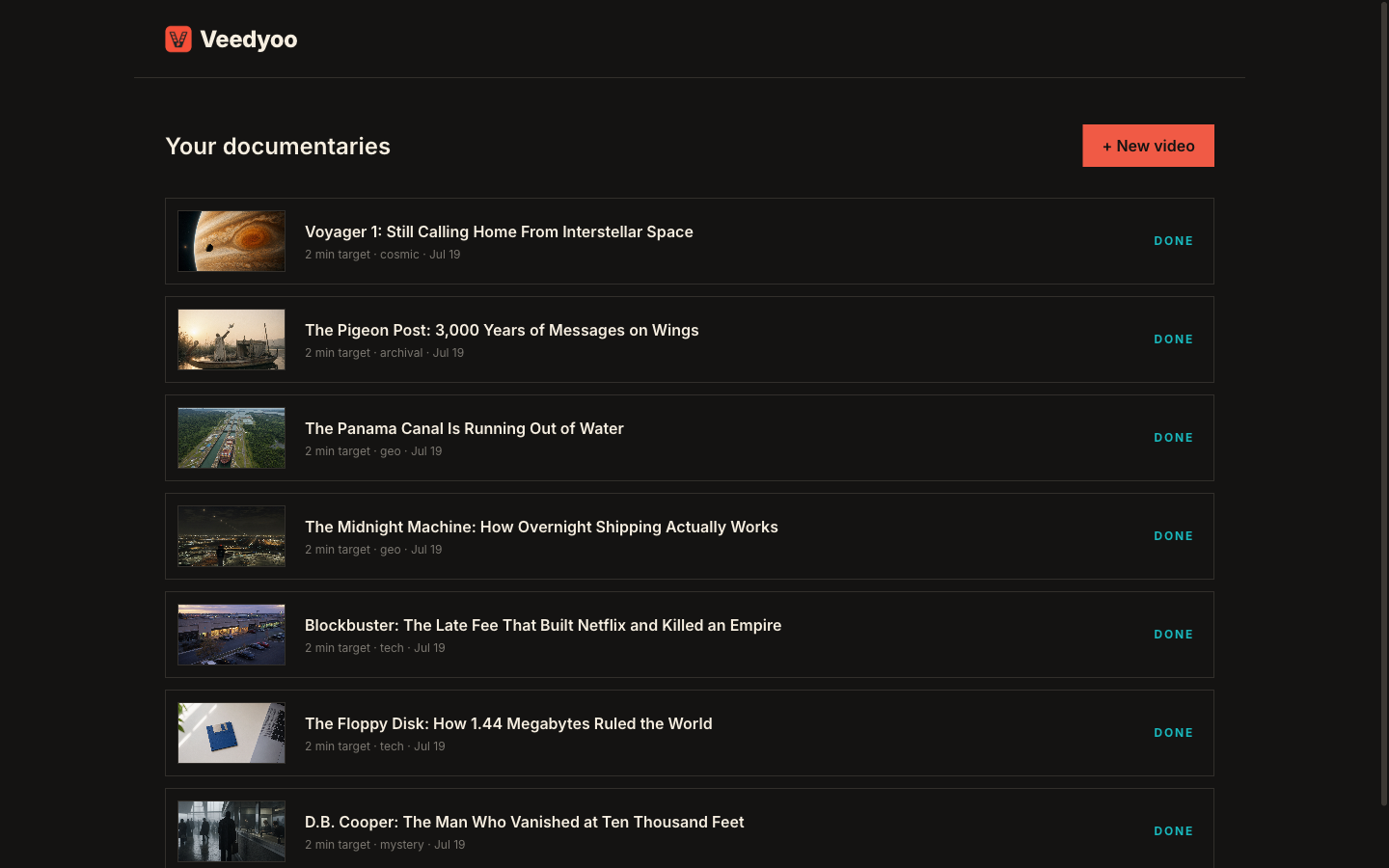
Veedyoo’s pricing page currently says top-ups start at $5, there is no subscription, and purchased credits are valid for one month. It gives about $1 per finished minute as a broad reference for a typical documentary, including cloud rendering. That is an estimate, not a fixed per-minute tariff. A project with more scenes, more regenerated visuals, repeated voice takes, or several renders can cost more.
The advantage is straightforward: a quiet month can cost zero, while a creator testing one idea can start with a small balance. The tradeoff is that the final number depends on the production decisions inside the project. Check the estimate and credit balance before generating, then revise the inexpensive parts of the plan before producing costly assets.
It suits uneven schedules and niche tests before a weekly commitment. Our faceless YouTube workflow explains why planning the argument and scenes first can prevent waste later.
Model 2: a recurring production subscription
A subscription exchanges flexibility for reserved monthly capacity. It is easiest to justify when the team publishes consistently enough to use most of the allowance.
VidRush displayed three monthly plans when we checked: Starter at 99 for 36 minutes and up to six videos, Creator at 239 for 109 minutes and up to 18 videos, and Pro at 639 for 327 minutes and up to 56 videos. Its pricing FAQ describes a range of $1.93–$2.72 per finished minute and says annual billing saves 20%.
There is a currency caveat. The public pricing FAQ uses dollar signs, while VidRush’s current terms state that subscription prices are in pounds sterling. Verify the checkout currency for your location rather than relying on a converted number in a comparison article.
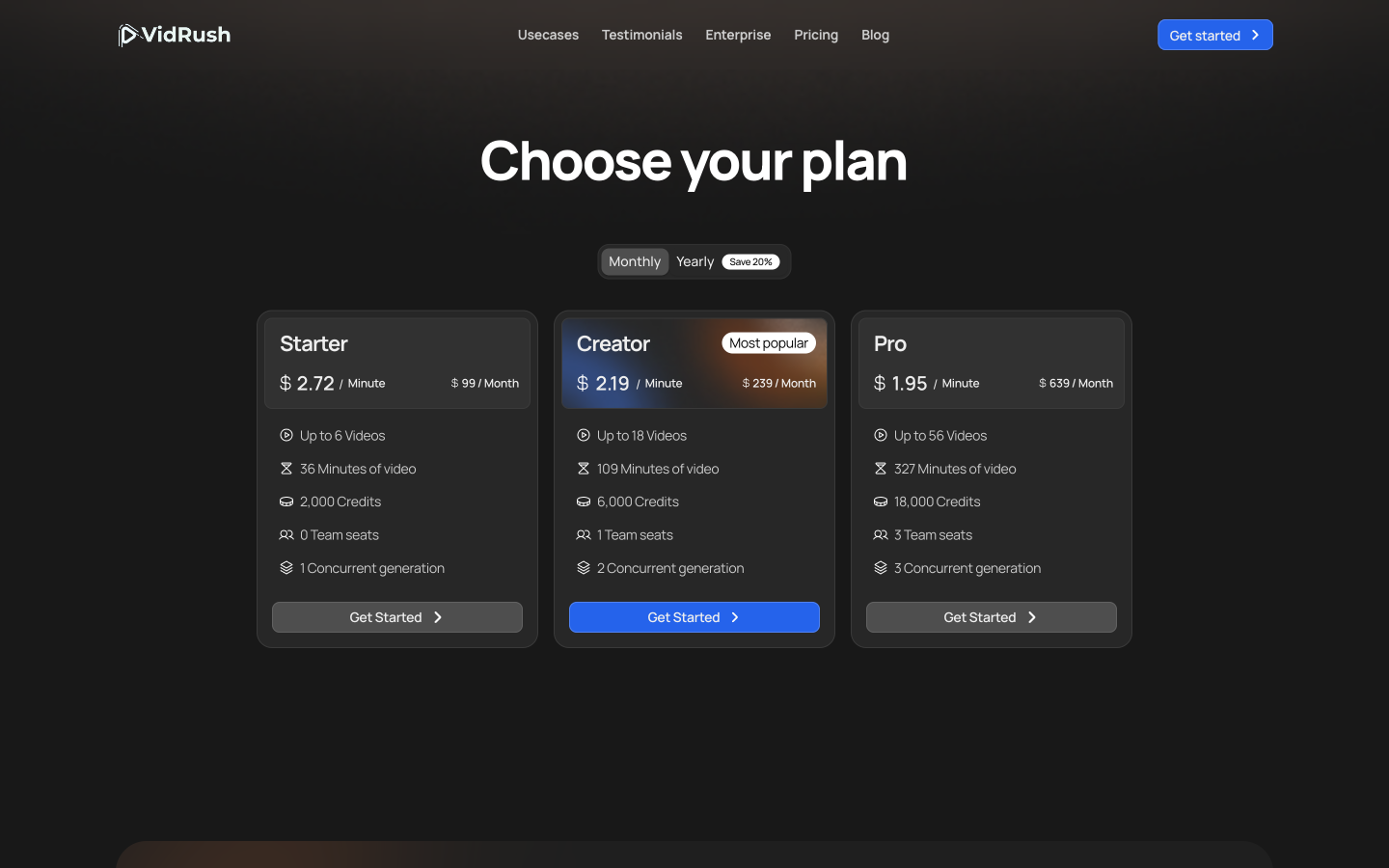
The advertised cost per minute assumes you use the plan efficiently. If you pay 99 and publish only one five-minute video, your effective platform cost is 99 for that video, or 19.80 per minute of output actually used. That does not mean the tool charges 19.80 for each minute; it shows the cost of unused capacity.
VidRush also says that bringing your own voiceover does not reduce its credit cost because credits cover the full pipeline. For a deeper workflow comparison, read Veedyoo vs VidRush.
Model 3: subscription plus bring-your-own cloud
OpenVidi separates orchestration from AI compute. Its public plans were $29 per month for Starter, $79 for Pro, and $199 for Agency. The video generation itself runs through a Google Cloud project connected by the user, so the platform subscription is not the complete production cost.
OpenVidi publicly estimates about $35–$55 in Google compute for one full video and about $8 for a 45-second Short after promotional credit is exhausted. It also promotes the $300 introductory Google Cloud credit available to eligible new accounts. That credit is a Google promotion, not a permanent discount from OpenVidi, and eligibility and expiration matter.
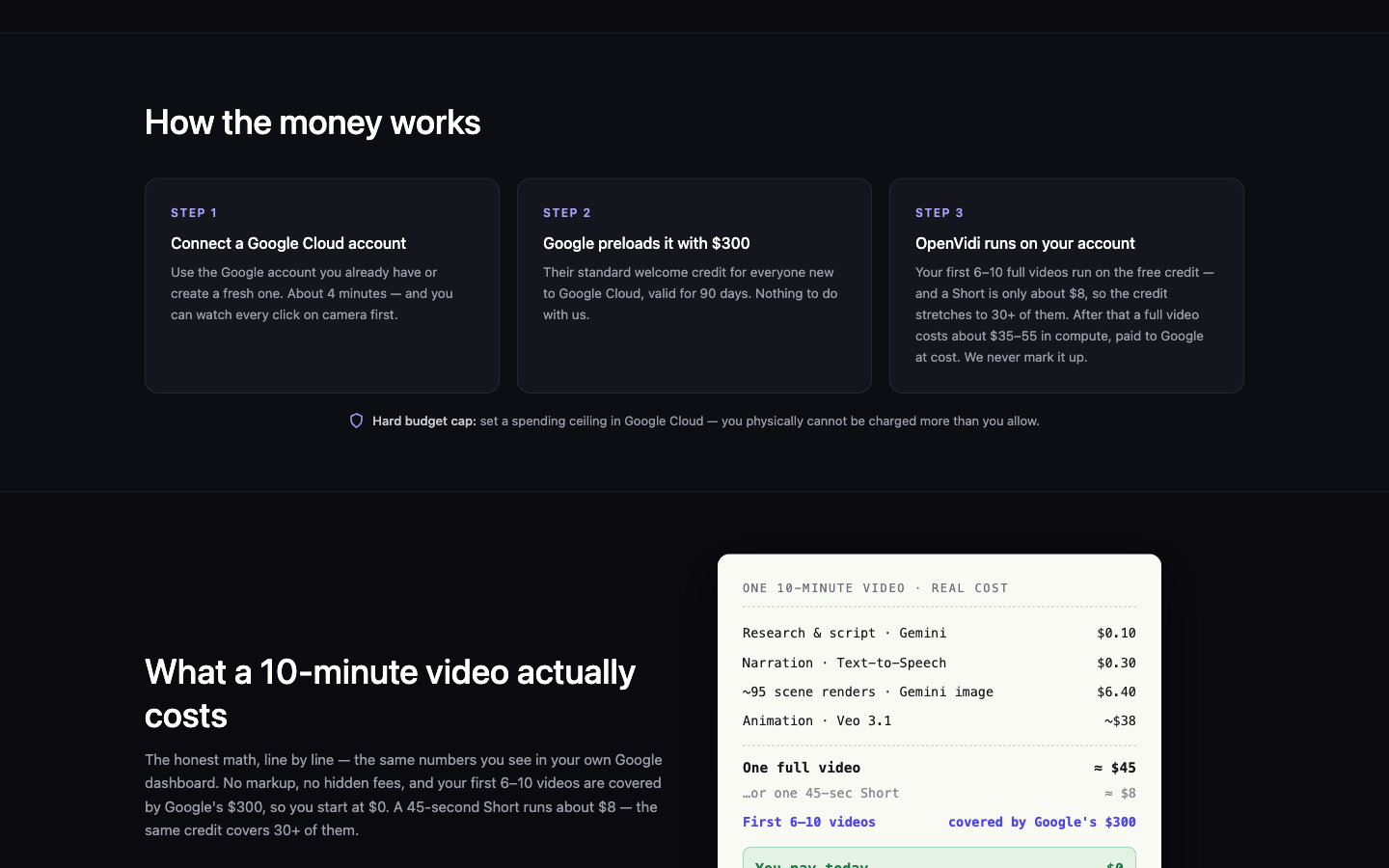
This structure can appeal to a technical creator who wants the cloud project, files, and compute billing in their own account. It also creates operational work: setting up credentials, enabling services, monitoring spend, understanding the promotion, and securing the project. Our OpenVidi alternative guide compares that responsibility with a managed credit workflow.
What actually drives the final cost?
Regardless of billing model, these variables move the bill:
- Duration. More narration usually means more scenes, media, synthesis, and render time.
- Scene density. A calm ten-minute essay with 30 shots and a fast listicle with 100 shots are not equivalent jobs.
- Motion. Animating generated images can cost materially more than using stills, maps, charts, or Ken Burns movement.
- Regeneration. Rewriting before production is cheap. Recreating voices, images, clips, and complete renders is not.
- Resolution and output. Higher resolution, longer renders, multiple aspect ratios, and repeated exports can add compute or plan requirements.
- Media sourcing. Stock subscriptions, licensed archives, commissioned assets, or rights review may sit outside the AI tool.
- Human review. Fact-checking, source verification, pacing changes, caption correction, and final quality control still consume time.
- Unused capacity. A subscription is only predictable value when the team uses what it reserves.
- Currency and tax. The card price, checkout currency, VAT, and conversion fee can differ.
The best cost-saving step is usually editorial: settle the thesis, chapter order, narration, and visual intent before expensive production. The script-to-storyboard guide shows how to do that scene by scene.
A practical break-even framework
Start with the output you will realistically publish, not the maximum you hope to publish.
For each option, write down:
- the fixed monthly platform fee;
- the expected generation and render usage;
- external compute or media bills;
- the number of finished videos you will actually publish;
- the finished minutes you will actually use;
- the value of your setup and review time.
Then compare two effective figures:
Effective cost per published video = total monthly production spend ÷ videos actually published.
Effective cost per used minute = total monthly production spend ÷ finished minutes actually published.
These are management numbers, not quality scores. A minute built from sourced footage, a minute of animated AI imagery, and a minute containing maps and data scenes can require very different work.
Illustrative scenario: one five-minute documentary
Using Veedyoo’s broad public reference of roughly $1 per minute, five minutes suggests a starting estimate near $5. The actual project can move above or below that reference depending on scenes and revisions.
VidRush Starter has a fixed displayed monthly price of 99. If that one five-minute film is the only output used, the illustrative effective cost is 99 per published video. More of the included 36 minutes would remain available that month.
For OpenVidi, the disclosed numbers do not support a reliable five-minute estimate. The known minimum is the $29 Starter subscription plus actual Google compute. Do not scale its $35–$55 “full video” estimate down to five minutes unless the product provides the project’s own estimate.
Illustrative scenario: four full videos per month
Suppose OpenVidi’s public full-video compute range applies to all four projects after promotional credits. The arithmetic is $29 + (4 × $35–$55), producing an illustrative monthly range of $169–$249. This is not a quote; scene choices and Google pricing can change the compute.
For VidRush, four ten-minute videos would total 40 minutes. That exceeds the Starter card’s 36-minute allowance, so the next question is not simply cost per video: it is which plan or overage rule covers the actual length. The Creator card includes 109 minutes at a displayed 239 per month, making the illustrative effective platform cost 59.75 per published video if only four are produced.
For Veedyoo, applying the rough $1-per-minute reference to 40 minutes suggests about $40, but it should remain a planning reference rather than a guaranteed quote. Confirm the project estimates, especially if the films use many generated or regenerated assets.
Hidden costs to check before choosing
- Credit expiration or rollover. Veedyoo’s purchased credits are valid for one month. VidRush’s terms say unused subscription credits expire at the end of its billing cycle. Model only the capacity you expect to use.
- Promotional cloud credit. Model the post-promotion bill from day one. Free credit changes cash timing, not the long-term unit economics.
- Setup and security. A bring-your-own-cloud workflow requires credential handling, budget alerts, access control, and troubleshooting.
- Revision policy. Find out whether replacing one shot, re-voicing a sentence, or re-rendering the film consumes credits or compute.
- Rights and licensing. A generated or sourced asset still needs review for the intended commercial use.
- External editing. If every video must be exported to another editor for cleanup, include that software and labor.
- Failed experiments. Budget for ideas that do not become publishable videos. Production output is not the same as successful output.
Decision checklist
Choose pay-as-you-go credits when production is sporadic, the initial budget is small, or you are validating a new channel. Choose a subscription when your monthly volume is stable enough to use the allowance and concurrency matters. Choose bring-your-own cloud when you are comfortable owning the cloud setup and want direct visibility into the compute bill.
Before paying, answer five questions:
- How many finished minutes did I actually publish during the last three months?
- Do I need sourced footage, generated scenes, or a mix?
- How many revisions does a normal video require?
- Who will monitor credits, cloud spend, and rights?
- What happens financially in a month when I publish nothing?
If the honest answer to the last question is “I still pay the full plan,” include that unused capacity in the decision.
Frequently asked questions
What is the cheapest AI documentary video maker?
There is no universal cheapest option because output length, visuals, and revision count differ. For a small or irregular workload, a $5 pay-as-you-go entry creates less fixed exposure. A subscription may become more convenient at steady volume. A BYO-cloud product can be attractive during a promotion but must be evaluated at its post-promotion compute cost.
Is a per-minute price enough to compare products?
No. Confirm whether it includes scripting, narration, footage or images, animation, captions, editing, rendering, and revisions. Also check whether the advertised per-minute figure assumes the entire monthly allowance is used.
Is Google’s $300 credit part of the OpenVidi subscription?
No. It is a separate Google Cloud introductory offer for eligible new customers, subject to Google’s current terms and expiration. OpenVidi’s monthly subscription remains a separate charge.
Does using my own script or voice reduce the price?
It depends on the platform. VidRush explicitly says an uploaded voiceover does not reduce its credit cost because the credits cover the full pipeline. Other systems may price individual production steps differently, so inspect the estimate before generating.
How can I avoid overspending on AI video?
Finalize the story and storyboard first, generate only the scenes you need, revise individual assets instead of restarting the project, set cloud budgets where relevant, and calculate cost using output actually published.
When were these prices checked?
July 19, 2026. Recheck every linked pricing page before purchasing because plans, promotions, allowances, currencies, and compute rates can change.
Sources
- Veedyoo pricing
- VidRush pricing
- VidRush terms and subscription rules
- OpenVidi pricing
- Google Cloud free program
Ready to budget a real project? Review Veedyoo pricing, then open the Veedyoo studio and start with the documentary you actually intend to publish.
Start with a real budget, not a contract
Create an editable documentary with Veedyoo, review the plan, and use pay-as-you-go credits only when you are ready to produce.
Start creating with Veedyoo