Best AI Documentary Video Generators: 3 Workflows Compared
Compare Veedyoo, VidRush, and OpenVidi by workflow, pricing, editing, infrastructure, and the documentary production job each one fits.

The best AI documentary video generator depends on the production model you need. Veedyoo fits creators who want a managed, scene-directed studio without a subscription. VidRush fits recurring long-form production built around sourced footage and monthly capacity. OpenVidi fits creators willing to connect Google Cloud for direct cloud usage and storage control.
That is a fit comparison, not an output-quality ranking. All three services can move a project from an idea toward a narrated long-form video, but they do not perform the same job in the same way. Choosing by the longest feature list can leave you paying for the wrong workflow.
AI documentary generators compared at a glance
| Decision factor | Veedyoo | VidRush | OpenVidi |
|---|---|---|---|
| Best documented fit | Scene-directed documentaries with maps, timelines, data, cinematic imagery, and timeline editing | Repeatable long-form production using relevant footage available online | Long-form generation through a customer-connected Google Cloud project |
| Commercial model | No subscription; starter credits and top-ups from $5 | Monthly plans displayed from 99, with credits and production capacity | Subscription from $29 per month plus separate Google Cloud usage |
| Planning approach | Topic, creative direction, length, and genre become an editable documentary scene plan | A brief, script, voiceover, footage, or a combination enters a long-form production pipeline | Topic, script, or supported voiceover moves through research and staged approvals |
| Editing emphasis | Storyboard connected to a multi-track editor, preview, scene regeneration, and render | Built-in editor for media, text, audio, timing, animation, and rendering | Script versions, scene prompts, retries, animation choices, preview, and rebuild |
| Infrastructure work | Managed inside the product | Managed inside the product | Customer configures a Google Cloud project, APIs, storage, billing, and credentials |
| Strongest reason to shortlist | Documentary-specific visual direction without recurring commitment | Published long-form range, team seats, and concurrent generations on higher plans | Media in the customer's cloud bucket and direct provider-usage visibility |
This is not an apples-to-apples price table. One service may emphasize sourced footage, another generated explanatory scenes, and another cloud ownership. Our AI documentary cost guide separates the platform fee, usage, unused capacity, and cloud compute so you can normalize a real project.
1. Veedyoo: best fit for scene-directed documentary production
Veedyoo is the strongest fit of these three when the documentary needs more than a continuous sequence of generic B-roll. It turns a topic, target length, genre, and creative direction into a structured scene plan. Each scene keeps its narration, duration, visual direction, and treatment attached as the project moves into production.
The visual vocabulary is the key distinction. A place can become a globe or map scene. A sequence of events can use a timeline. A numerical claim can become a data scene. Other ideas can use archival-style images, kinetic typography, whiteboard explanations, or cinematic generated imagery. The creator reviews those choices before the final render and can change the scene rather than rebuilding the whole video.
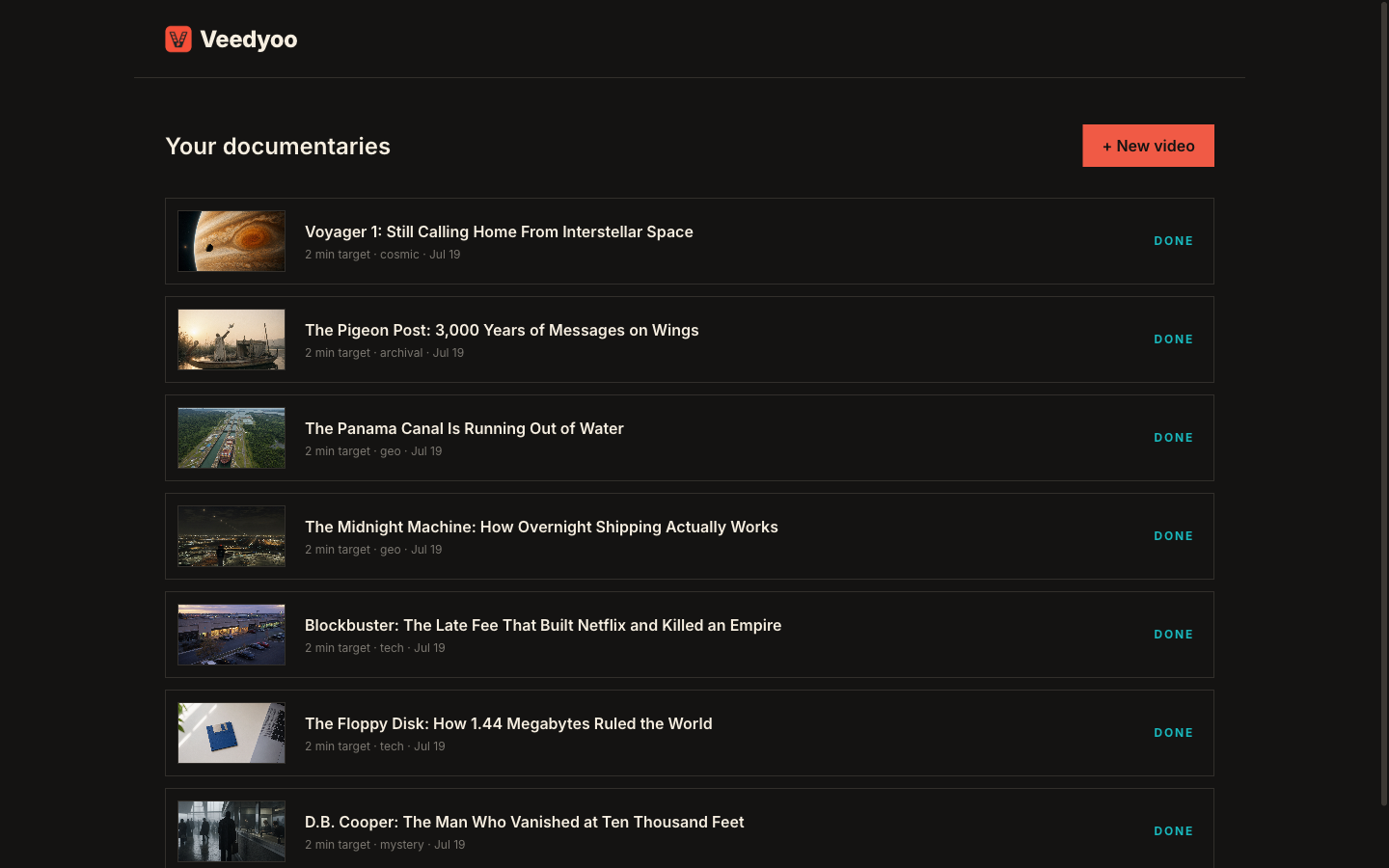
Veedyoo’s storyboard remains connected to a multi-track editing surface. Creators can inspect narration and visuals, reorder or trim scenes, work with overlays and music, regenerate individual assets, preview the assembled cut, and then send it to cloud rendering. The documentary video maker page shows that topic-to-film workflow in more detail.
The commercial model suits irregular publishing. Current Veedyoo pricing has no monthly subscription, includes starter credits, and offers top-ups from $5. Editing and previewing do not use credits; asset generation and rendering do. Purchased credits currently remain valid for one month, so pay-as-you-go does not mean a permanent balance.
Veedyoo is less clearly suited to a large operation that needs advertised seat packages and many simultaneous generations. Its public offer is creator-oriented. A team with formal permission, throughput, or procurement requirements should verify those requirements before adopting it.
Shortlist Veedyoo when: you want to direct how facts are visualized, you need maps or timelines alongside cinematic scenes, your schedule is uneven, and you prefer managed infrastructure with no recurring base plan.
2. VidRush: best fit for recurring, footage-led long-form production
VidRush’s public positioning is built around turning one brief into a publish-ready long-form video. Its homepage accepts a paragraph, script, raw footage, voiceover, or a mixture. The documented pipeline covers research, scripting, narration, matching visuals, editing, and rendering.
Its pricing FAQ describes Documentary and Top 10 formats from 6 to 40 minutes and says the workflow works best when relevant real-world footage is available online. That makes VidRush a natural shortlist candidate for history, finance, transport, nature, true crime, and other subjects with a deep footage pool. It may be less natural when every chapter depends on purpose-built maps, diagrams, or a rare private archive that has not been provided.
VidRush does have an editor. Its official editor documentation covers replacing media, uploading assets, adjusting text and audio, changing timing and animation, and rendering. That shipped editor should be separated from future features that its public site may label as coming soon.
The main commercial difference is commitment. VidRush’s public pricing displayed Starter at $99 per month, Creator at $239, and Pro at $639 when checked. Higher tiers add seats, credits, estimated output minutes, and concurrent generations. Its documentation describes pay-as-you-go credits as additional capacity after an active plan allowance is used, rather than a subscription-free entry.
That structure can work well for a channel or studio that publishes every month. Reserved capacity, multiple seats, and concurrent work may be worth more than minimizing the cost of one test video. It is a weaker fit when output is sporadic and much of the monthly allowance would expire unused. There is also a currency detail to verify: pricing cards used dollar signs when checked, while VidRush’s terms described subscription prices in pounds sterling.
Read the full Veedyoo vs VidRush comparison for documented plan, editor, footage, and credit differences.
Shortlist VidRush when: you publish long-form videos on a dependable schedule, the topics have ample online footage, you can use a monthly allowance, or you need documented team seats and concurrency.
3. OpenVidi: best fit for customer-owned Google Cloud infrastructure
OpenVidi differs most clearly at the infrastructure boundary. Its public tutorial asks the creator to connect a Google Cloud project, enable services including Vertex AI, Cloud Storage, and Text-to-Speech, create a service account, download a JSON key, upload it to OpenVidi, and test the connection.
That arrangement creates two bills: the OpenVidi software subscription and eligible usage in the customer’s Google Cloud account. OpenVidi’s pricing page listed Starter at $29 per month, Pro at $79, and Agency at $199 when checked. Its homepage estimated roughly $35–$55 in Google compute for a full video and around $8 for a 45-second Short after promotional credit, but project choices and provider pricing can change those figures.
The benefit is direct cloud ownership. OpenVidi’s terms and privacy information say media stays in the customer’s Google Cloud Storage bucket and describe uploaded credentials as encrypted at rest and removable through Settings. A technical creator may value that storage boundary and the ability to inspect provider usage directly.
The cost is operational responsibility. The customer must manage the project, permissions, credential lifecycle, billing, and budget alerts. Google Cloud budgets are alerts rather than guaranteed hard caps, so a team should use a dedicated project, least-privilege permissions, monitored billing, and a key-revocation process. Introductory cloud credit should be modeled as temporary, subject to Google’s eligibility and expiration rules.
OpenVidi’s documented workflow is not a blind one-click process. Its tutorial describes script review and versions, voice selection, scene-grid approval, prompt editing, individual scene retries, image-animation choices, preview, and final assembly. This staged approval pipeline may suit teams that want a gate before each compute-heavy production phase.
Our detailed OpenVidi alternative guide compares this bring-your-own-cloud model with Veedyoo’s managed workflow.
Shortlist OpenVidi when: you are comfortable administering Google Cloud, keeping media in your own bucket matters, direct provider usage is useful, and staged production approvals fit your process.
How to choose the right AI documentary generator
Use one representative documentary, not a generic demo prompt. Write a one-page brief with the same topic, target duration, audience, source requirements, voice assumptions, and visual direction. Then evaluate these six factors.
- Visual grammar. Does the story need sourced footage, generated cinematic scenes, maps, dates, charts, or a mix? A product optimized for one visual language should not be judged as if it were another.
- Editorial control. Decide when you need approval: at the script, storyboard, individual scene, assembled timeline, or final render. Confirm that revisions happen at that level.
- Real monthly volume. Use the finished minutes you published during the last three months, not an optimistic target. Unused subscription capacity is still a cost.
- Infrastructure boundary. Choose whether the vendor should manage generation and rendering or whether your team genuinely wants to own cloud setup, credentials, storage, and billing.
- Revision economics. Ask what consumes credits or compute: a new image, one line of narration, an animation retry, a preview, or a complete render. The first generation is rarely the final cost.
- Team requirements. Check seats, permissions, simultaneous projects, review workflows, storage policy, and support before treating a creator plan as a studio system.
After the shortlist, run the same brief under a fixed revision budget. Save the settings, final cost, production time, failed attempts, and human cleanup required. Only then compare output quality. A polished homepage demo cannot answer how a tool handles your sources, pacing, names, numbers, and normal review process.
Frequently asked questions
What is the best AI documentary video generator for YouTube?
For a scene-directed documentary with maps, timelines, data, and no subscription, Veedyoo is the clearest fit. For recurring 6–40-minute, footage-led production with monthly capacity, shortlist VidRush. For a workflow tied to your own Google Cloud project and storage bucket, shortlist OpenVidi. Test the same representative brief before choosing by output quality.
Which AI documentary maker has no monthly subscription?
Veedyoo currently uses pay-as-you-go credits without a monthly subscription; top-ups start at $5. VidRush’s public offer is subscription-led, with additional pay-as-you-go capacity documented after plan credits are used. OpenVidi charges a platform subscription plus separate Google Cloud usage.
Can these tools edit a generated documentary?
Yes, but their editing models differ. Veedyoo connects its storyboard to a multi-track timeline. VidRush documents a built-in editor for media, text, audio, timing, and animation. OpenVidi documents script versions, scene prompt edits and retries, animation choices, preview, and rebuilding through production stages.
Which option is cheapest?
There is no universal cheapest option. A pay-as-you-go product minimizes fixed commitment; a subscription can make sense when most capacity is used; and bring-your-own-cloud separates the software fee from compute. Compare the total for a representative month, including regeneration, rendering, external media, unused allowance, and human review.
Are AI documentary generators fully automatic?
They can automate large parts of research, planning, narration, asset creation, assembly, and rendering, but factual review and editorial judgment remain necessary. Check sources, names, quotations, dates, rights, pacing, captions, and every visual claim before publishing.
Does this roundup rank video quality?
No. We have not completed a paid, controlled same-brief test across all three tools. This article compares verifiable public product fit, workflow, price structure, editing, and infrastructure. A defensible quality ranking needs equivalent inputs, settings, revision budgets, and disclosed scoring criteria.
Sources
- Veedyoo documentary video maker
- Veedyoo pricing
- VidRush homepage
- VidRush pricing
- VidRush pricing documentation
- VidRush video editor documentation
- OpenVidi homepage
- OpenVidi pricing
- OpenVidi tutorial
- OpenVidi Terms of Service
- OpenVidi Privacy Policy
- Google Cloud budgets and alerts
Prices, allowances, promotions, and feature labels can change. Recheck the linked pages before purchasing. Veedyoo is not affiliated with or endorsed by VidRush, OpenVidi, or Google Cloud.
Direct your first documentary scene by scene
Start with a topic, review the storyboard, edit the assembled film, and use pay-as-you-go credits when you are ready to produce.
Try Veedyoo